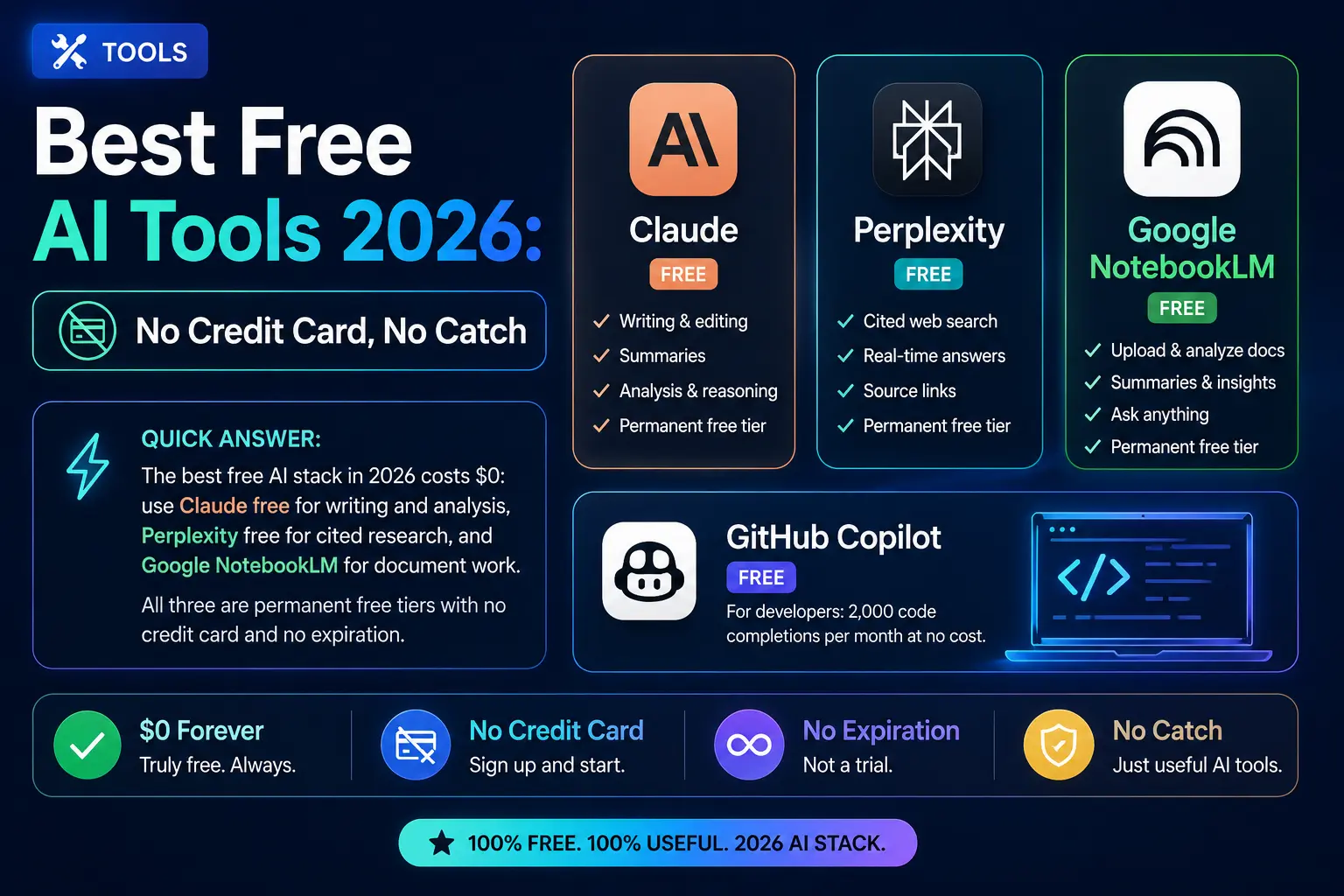
Best Free AI Tools 2026: No Credit Card, No Catch
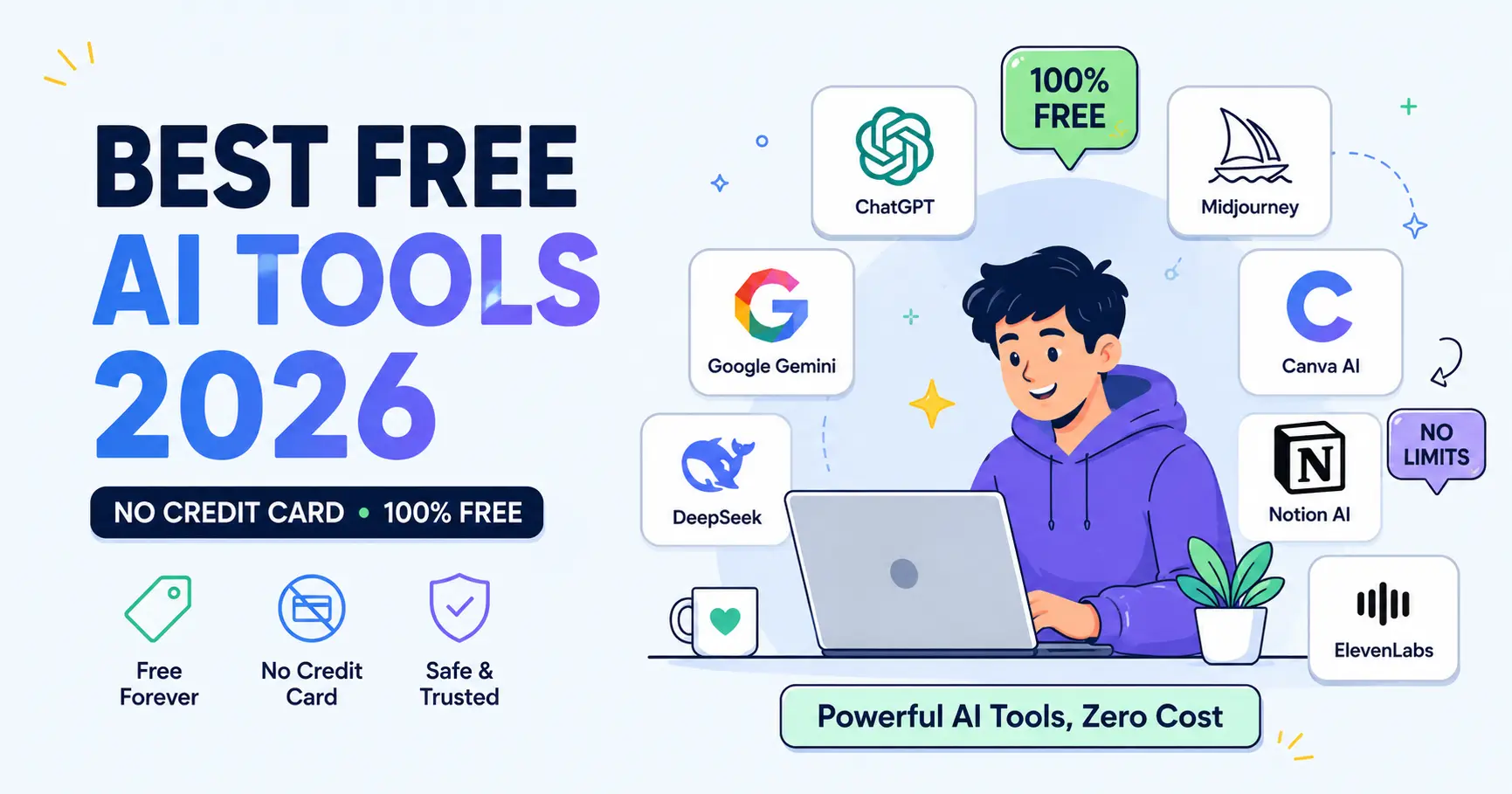
Best Free AI Tools 2026
Quick answer:
The best free AI stack in 2026 costs $0: use Claude free for writing and analysis, Perplexity free for cited research, and Google NotebookLM for document work. All three are permanent free tiers with no credit card and no expiration. For developers, GitHub Copilot free adds 2,000 code completions per month at no cost. None of these are trials.
Key takeaways
- Google NotebookLM is the only major AI tool in 2026 that is 100% free with no usage cap, no credit card, and no time limit. It supports 100 notebooks and 50 sources per notebook.
- Claude’s free tier runs Claude Sonnet 4.6 and allows roughly 5 conversations per day. It produces the highest writing quality of any free AI chatbot in 2026 according to independent blind evaluations.
- ChatGPT’s free tier in 2026 runs GPT-4o mini as the default, not GPT-5. You get about 16 GPT-4o messages per 3-hour window before being downgraded to the smaller model. OpenAI added ads to the free tier in early 2026.
- GitHub Copilot’s free plan, launched in late 2025, gives all individual developers 2,000 code completions and 50 premium model requests per month. No student email or open-source project required.
- Perplexity free gives unlimited standard searches with cited sources and 5 Pro searches per day. It is the best free option for fact-checked, verifiable research.
- The smartest free strategy in 2026 is to rotate between two or three tools rather than pushing one to its limit. Each free tier excels at something different.
The average American professional now pays for three or four software subscriptions they barely use. Adding another $20 per month for AI feels unnecessary when the free tiers of the same tools are legitimately powerful.
In 2026, the free AI tier is no longer a teaser. Anthropic, OpenAI, Google, and Microsoft are all competing for the same users, and that competition means free plans have more capability than paid plans did three years ago. The catch is that every free tier has real limits — and most companies make those limits deliberately hard to find.
This guide documents exactly what you get for $0 from the best AI tools in 2026: the model, the daily caps, the features that are actually available without a credit card, and the point at which upgrading makes financial sense.
Quick verdict: best free AI tool per use case
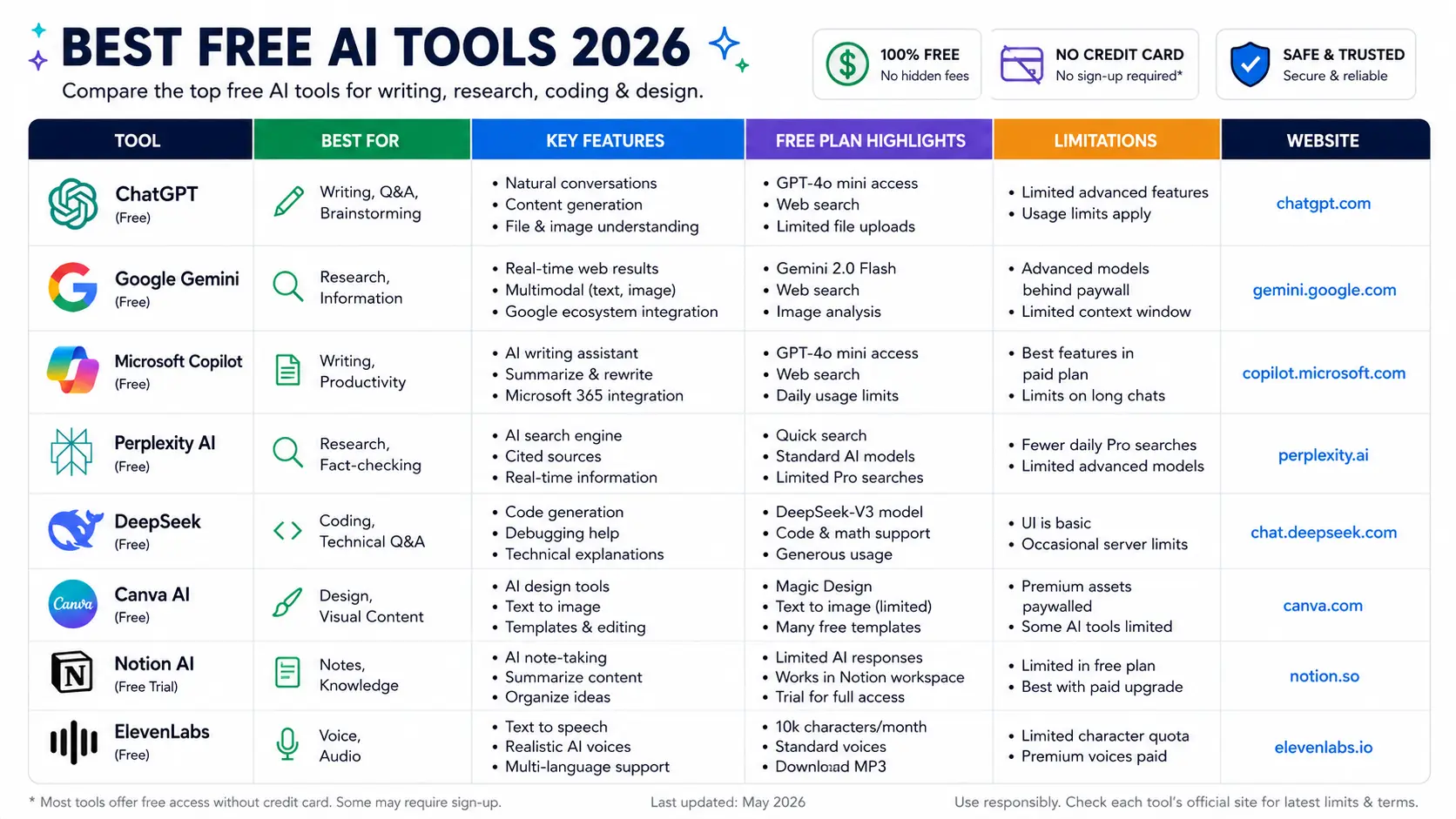
Use this table as your starting point. Each tool below is permanently free with no trial period and no credit card required.
| Use case | Best free tool | What you get free | Main limit |
|---|---|---|---|
| Writing and analysis | Claude (Anthropic) | Claude Sonnet 4.6, document uploads | ~5 conversations/day |
| General chat | ChatGPT (OpenAI) | GPT-4o mini unlimited, GPT-4o limited | ~16 GPT-4o msgs per 3 hrs |
| Research with citations | Perplexity | Unlimited standard search, cited answers | 5 Pro searches/day |
| Document analysis | NotebookLM (Google) | 100 notebooks, 50 sources each, fully free | No meaningful cap |
| Google Workspace users | Gemini (Google) | Gemini Flash, image understanding | No Gemini Pro without $20/mo |
| Coding assistance | GitHub Copilot | 2,000 completions, 50 premium requests/mo | 50 requests runs out fast |
| AI image generation | Ideogram | Daily free credits, best text-in-image accuracy | Limited daily generations |
| Design and social media | Canva | AI design features, ~20 AI image gens/day | Premium templates behind paywall |
All free tiers verified as of May 2026. No credit card required for any tool listed.
Free AI chatbots: Claude, ChatGPT, and Gemini compared
Claude free: best writing quality, strictest daily limits
Claude’s free tier at claude.ai gives you access to Claude Sonnet 4.6, Anthropic’s mid-tier model. This is not a stripped-down version of Claude — it is the same model developers access via the API at $3 per million input tokens. What you give up on the free tier is volume: roughly 5 conversations per day, with each conversation capable of handling documents up to 50 pages in a single prompt.
Why it matters: independent blind evaluations in Q1 2026 found that Claude-generated content was preferred by users 47% of the time compared to 29% for GPT-5.5 and 24% for Gemini. Even on the free tier, that writing quality advantage holds. If you are drafting something that matters — an investor memo, a client proposal, a performance review — Claude’s free tier often produces output that needs less editing than any competitor.
The limit that bites: approximately 5 conversations per day. That is enough for a professional who uses AI selectively. It is not enough for someone who fires off queries every 20 minutes. Save your Claude free messages for the tasks where quality actually matters.
ChatGPT free: broadest features, hidden model downgrade
ChatGPT’s free tier is the most feature-rich of the three major chatbot free tiers. You get text generation, limited image analysis, 2 to 3 DALL-E image generations per day, basic web search, and file upload capability — all without a credit card. The interface is polished and the experience is beginner-friendly.
The catch most users do not realize: the free tier default model in 2026 is GPT-4o mini, not GPT-5 or even GPT-4o. You get approximately 16 GPT-4o messages per 3-hour window. When that limit is reached, ChatGPT silently falls back to GPT-4o mini, which is noticeably less capable on complex reasoning tasks. You can tell this has happened by checking the model indicator at the top of the chat window. OpenAI also introduced ads on the free tier in early 2026, which appear as sponsored suggestions in the interface.
Gemini free: best option if you live in Google Workspace
Gemini’s free consumer tier runs Gemini Flash as the default model. The standout feature is multimodal capability: image understanding, document analysis, and integration with Google Drive, Gmail, and Docs are all accessible without a paid subscription for basic use. The 1,500 requests-per-day limit on the free API tier through Google AI Studio is the most generous developer free tier from any major lab.
The limit: Gemini 3.1 Pro is locked behind Google AI Pro at $19.99 per month. Free users get Gemini Flash, which is fast and capable for everyday tasks but lags the Pro model on complex reasoning. If you are already paying for Google One, the bundled Google AI Pro is worth factoring into your total cost comparison. See our Claude vs Gemini 2026 guide for a full side-by-side breakdown.
Best free AI for research: Perplexity and NotebookLM
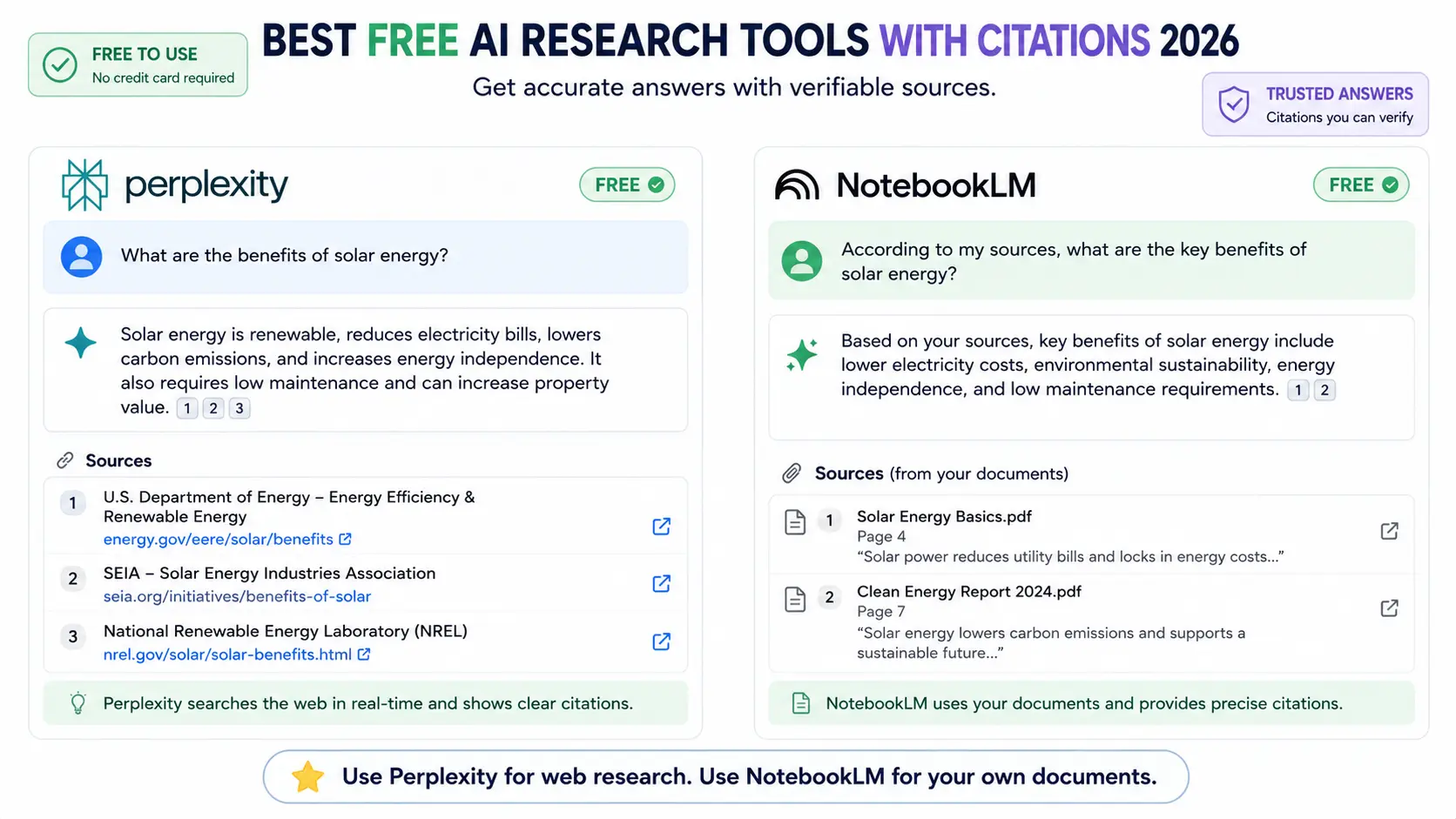
Perplexity free: unlimited cited search, 5 Pro searches per day
Perplexity is built differently from the other free chatbots. Every answer cites its sources with clickable links. You can verify every claim before using it. This makes it the only free AI tool in 2026 where the output is reliably fact-checkable without additional legwork.
The free tier gives you unlimited standard searches using Perplexity’s Sonar model and 5 Pro searches per day using stronger models from OpenAI and Anthropic. Standard searches handle most everyday queries well. Pro searches are worth saving for complex research questions that require synthesis across multiple sources.
The limitation that matters: Perplexity is purpose-built for research. It is not the right tool for writing assistance, long-form drafting, or coding. Treat it as your fact-checking and source-finding layer, then bring the verified information into Claude or ChatGPT for any writing that follows.
NotebookLM: the only truly unlimited free AI tool in 2026
Google’s NotebookLM is the outlier on this list. It is 100% free, requires only a Google account, and has no meaningful usage cap for typical professional use. You get 100 notebooks, 50 sources per notebook, and source capacity up to 500,000 words per source. Upload PDFs, Google Docs, YouTube transcripts, and websites — then ask questions that are grounded exclusively in your uploaded material.
The key differentiator from every other tool on this list: NotebookLM cannot hallucinate facts from outside your documents because it only uses your uploaded sources to answer. If the answer is not in your sources, it says so. This makes it the most reliable free AI tool for research, legal review, academic study, and any work where accuracy on specific documents matters more than general AI capability.
The Audio Overview feature, which generates a podcast-style discussion of your documents between two AI hosts, is also fully free and genuinely useful for processing dense material.
Best free AI for coding: GitHub Copilot and Cursor
GitHub Copilot free: 2,000 completions per month for all developers
GitHub Copilot’s free plan, launched in late 2025, is the most significant change to the free AI coding landscape in two years. It is available to all individual developers — no student email, no open-source project required. You get 2,000 code completions per month (Tab autocomplete) and 50 premium model requests per month. The 50 premium requests give you access to Claude Sonnet 4.6 and GPT-4.1 in chat mode, not just the smallest available models.
The limit that bites first: 50 premium requests per month is approximately 2 to 3 chat interactions per day. If you ask the AI a question every 10 minutes, you exhaust your monthly quota in a single day. The free tier works best for developers who use AI chat intentionally for complex questions rather than continuously for every small task.
For a full comparison of coding tools including paid options, see our guide on best AI tools for coding in 2026.
Cursor free: 50 premium requests and 2,000 completions
Cursor’s free tier mirrors Copilot’s numbers: 2,000 code completions per month and 50 premium model requests. The difference is the interface. Cursor is a full VS Code fork with native multi-file editing, Composer mode, and a better context management system for large codebases. The premium requests tap into Claude Sonnet 4.6 and GPT-4.1, same as Copilot.
The honest assessment: both Copilot free and Cursor free work for developers coding under 10 hours per week. Full-time developers hit the premium request cap within the first week of the month. At that point, the $10 per month Copilot Pro or the $20 per month Cursor Pro plan pays for itself in saved time within hours of use.
Best free AI for design and images: Canva and Ideogram
Canva free: AI design features with a reasonable daily image limit
Canva’s free tier includes AI image generation at approximately 20 generations per day, background removal, and AI-powered text-to-design features. For non-designers creating social media content, presentations, and marketing visuals, the free tier is genuinely sufficient for most projects. The AI generation quality has improved significantly since Canva integrated external model providers.
The paywall: premium templates, the full brand kit system, and advanced team collaboration are behind Canva Pro at $15 per month. For individual use on basic design tasks, the free tier holds up. The limit most users hit is premium template access, not the AI generation quota.
Ideogram free: the best free tool for text accuracy in AI images
Most free AI image generators struggle to render readable text inside images. Ideogram was built specifically to solve this problem. It generates images with accurate text rendering — useful for thumbnail design, poster concepts, and any marketing visual where a readable word or phrase needs to appear in the image itself. The free tier gives you a limited number of daily generations, enough for occasional creative needs.
For unlimited free image generation with lower quality expectations, Craiyon (formerly DALL-E mini) requires no account and has no daily limit — useful for rapid brainstorming and rough concept work.
The optimal free AI stack for 2026
The most effective free AI strategy in 2026 is not picking one tool and pushing it to its limit. It is matching each free tool to the task it handles best, staying comfortably within limits on all of them.
Here is the practical free stack for a US professional or knowledge worker:
- Claude free for writing and document analysis: Use it for your most important writing tasks of the day. Investor memos, client communications, long documents, anything where quality matters and you want to spend less time editing. Reserve it — do not waste the daily limit on casual queries.
- Perplexity free for research: Any time you need a verifiable fact, a current statistic, or a real-time answer with citations, start here. Save your 5 Pro searches for complex synthesis questions. Use standard search for quick lookups.
- NotebookLM for specific document sets: Upload your company reports, research papers, or reference documents once. Ask questions about that specific material all month without hitting any limit. The grounded-in-sources guarantee makes it more trustworthy than any general chatbot for document-specific work.
- ChatGPT free for unlimited casual queries: When you need a quick answer, a brainstormed list, or want to try something experimental without spending your Claude daily limit, ChatGPT on GPT-4o mini handles it. Volume without consequence.
For developers, add GitHub Copilot free for autocomplete during coding sessions and save the 50 monthly premium requests for architectural questions and complex refactors. This four or five-tool stack costs $0, requires no credit card, and covers the core AI use cases for most professionals.
When does it make sense to pay? The tipping point is roughly when you hit rate limits more than twice a day. At that point, the productivity lost to switching platforms and waiting for resets costs more than the $20 per month upgrade on whichever tool you use most. For a full breakdown of whether the paid upgrade is worth it, see our Claude Pro vs ChatGPT Plus comparison.
For more options across every category, see the full AI tools guide for 2026.
Frequently asked questions
What are the best free AI tools in 2026 that require no credit card?
The best free AI tools in 2026 that require no credit card are Claude free (best writing quality, daily message limits), Perplexity free (unlimited cited searches, 5 Pro searches per day), Google NotebookLM (100% free for document analysis, 100 notebooks, 50 sources each), and GitHub Copilot free (2,000 code completions and 50 premium requests per month). For most professionals doing occasional AI work, these four tools cover the core use cases at zero cost.
Is ChatGPT actually free in 2026?
Yes, ChatGPT has a free tier in 2026 that requires no credit card. The free tier runs GPT-4o mini as the default model, not GPT-5. You get approximately 16 GPT-4o messages per 3-hour window before being downgraded to the smaller model. Free users also get 2 to 3 DALL-E image generations per day and limited web search. OpenAI introduced ads on the free tier in early 2026.
Is Claude free to use in 2026?
Yes. Claude offers a free tier at claude.ai that requires no credit card. Free users get access to Claude Sonnet 4.6, which is Anthropic’s mid-tier model. The free tier allows roughly 5 conversations per day and can handle documents up to 50 pages in a single prompt. Claude Pro at $20 per month removes limits and adds Claude Opus 4.7 access.
What is the best free AI tool for research in 2026?
Perplexity is the best free AI tool for research in 2026. The free tier gives you unlimited standard searches with cited sources and 5 Pro searches per day using stronger models. Every answer includes clickable citations so you can verify claims. Google NotebookLM is the best free tool for research on your own documents: upload up to 50 sources per notebook and ask questions that are grounded exclusively in your uploaded material.
How do I get the most out of free AI tools without hitting limits?
The most effective strategy is to rotate between two or three free tools based on their strengths rather than relying on one. Use Claude free for your most important writing tasks of the day, save Perplexity Pro searches for queries that need real-time sourced answers, and use ChatGPT free for casual unlimited queries on GPT-4o mini. When you hit limits on one platform, switch to another rather than waiting for resets. Batching similar tasks together also maximizes the value you get from limited daily quotas.
Final verdict
The best free AI tools in 2026 are genuinely capable, not just demos. Claude free produces better writing than paid tools from two years ago. NotebookLM is the most reliable document analysis tool available at any price for grounded, citation-backed answers from your own files. Perplexity free is the strongest research tool for verifiable information. GitHub Copilot free opened AI coding assistance to every developer without a subscription requirement.
The catch is limits. Free tiers are designed for selective use, not daily professional workflows at high volume. If you are hitting the limit more than twice a day on the tool you depend on most, that is the signal that $20 per month pays for itself. Until then, the four-tool free stack above covers most of what knowledge workers and developers actually need.
Start with Claude free at claude.ai today. No credit card, no trial period. If you hit the daily limit and find yourself waiting, that is the data point that tells you the $20 upgrade makes sense.
Get the daily AI brief
Delivered at 7:30 AM EST, Monday to Friday. The signal without the noise. Free. No fluff. Unsubscribe anytime.