
Gemini Notebook 2026: What Changed After the NotebookLM Rename
Gemini Notebook is Google’s new name for NotebookLM, but the practical story is bigger than a rebrand. Google says the source-grounded research tool will remain a standalone product while becoming more connected to the Gemini app and, eventually, Search.
Google announced the rename on July 16, 2026. For most users, the immediate takeaway is simple: your existing NotebookLM workflow is not disappearing. The larger shift is that Google wants notebooks to become a portable research layer across its AI products.
Quick answer: what is Gemini Notebook?
Gemini Notebook is NotebookLM under a new name, with tighter links to the Gemini app and future Google Search integration. It is still best for working with trusted source material, but Google is adding deeper data analysis, code execution, and cross-app syncing for supported users.
Key takeaways
- Google renamed NotebookLM to Gemini Notebook on July 16, 2026.
- The product remains a standalone source-grounded research tool.
- Existing shared notebooks and links should continue to work through automatic redirects, according to Google Workspace Updates.
- Notebooks can sync with the Gemini app, but grounding can differ between NotebookLM/Gemini Notebook and Gemini chats.
- Google says a secure cloud computer is rolling out to notebooks for deeper data analysis and native code execution.
- The safest use case is still research based on sources you trust, not unsupervised business decisions.
Gemini Notebook 2026: what changed?
The visible change is the name. NotebookLM is now Gemini Notebook. Google says the new name reflects the product’s role inside the broader Gemini ecosystem, including the Gemini app and future Search experiences.
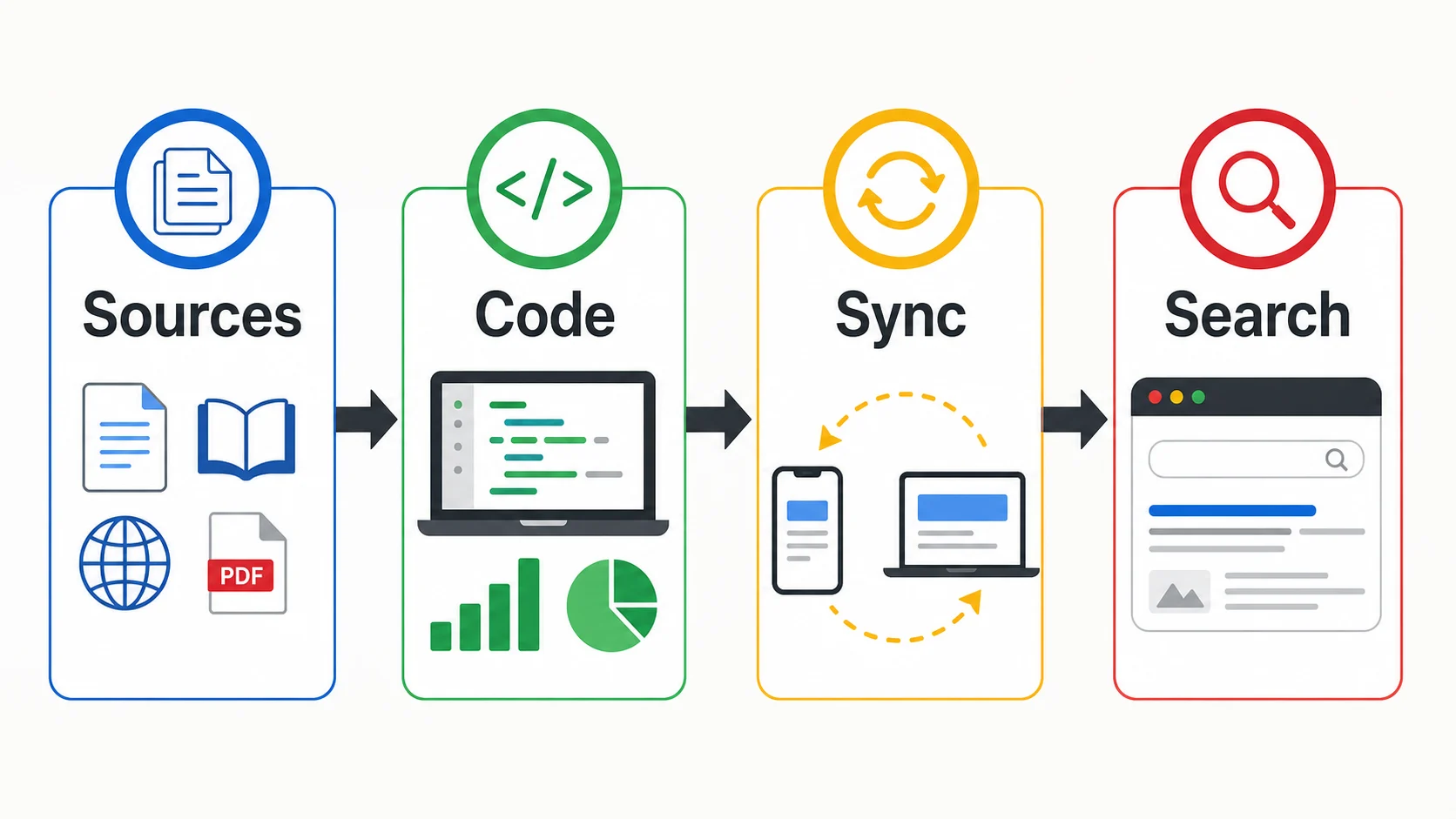
The more important change is workflow. Google is positioning notebooks as portable research spaces that can move across products. You can work with sources in the standalone notebook experience, access notebooks in Gemini, and eventually use notebooks inside AI Mode in Search.
What stayed the same after the NotebookLM rename?
The core product idea did not change. Gemini Notebook is still designed for source-grounded research. You add documents, websites, videos, notes, and other materials, then ask questions against that source set.
That distinction matters. A normal chatbot can answer from model knowledge, web results, and connected tools. A research notebook is most useful when you need answers grounded in a defined collection of sources. For students, analysts, marketers, founders, and consultants, that makes Gemini Notebook different from a general AI assistant.
If you want the broader comparison, BriefArticle’s NotebookLM vs ChatGPT vs Perplexity guide explains when to use each research tool. This update is narrower: it explains what the Gemini Notebook change means now.
Gemini Notebook vs NotebookLM: practical comparison
For users, the difference is less about a brand name and more about where the notebook can travel.
| Area | NotebookLM | Gemini Notebook |
|---|---|---|
| Name | NotebookLM | New Gemini-branded name |
| Core use | Source-grounded research | Still source-grounded research |
| Gemini app | Limited connection | Notebooks sync across apps |
| Analysis | Research and summaries | Adds code-enabled analysis for eligible users |
| Search | Separate from Search | Planned AI Mode integration |
How Gemini app syncing works
Google’s help documentation says notebooks can appear in Gemini’s navigation, and changes such as notebook names, sources, and custom instructions can sync between the Gemini app and NotebookLM/Gemini Notebook. That makes it easier to continue a research project without starting from a blank chat.
There is one important caveat: grounding is not identical in every surface. Google says NotebookLM responses are grounded exclusively in notebook sources, while Gemini responses may also use web search and other tools. That can be useful, but it also means users should check where an answer came from before trusting it.
For serious research, keep this rule: use Gemini Notebook when the answer must stay close to your uploaded sources. Use Gemini when you want a broader assistant that can combine your notebook with other tools or web context.
Code execution makes Gemini Notebook more useful for data work
Google says it has started rolling out a secure cloud computer for notebooks. This lets Gemini Notebook write and run code natively, which can help with structured research, spreadsheet-style analysis, charts, and deeper inspection of source material.
That is a meaningful upgrade for users who previously treated NotebookLM as a reading and summarization tool. With code execution, a notebook can become more useful for tasks such as cleaning survey exports, comparing data tables, analyzing interview notes, or turning source material into charts and structured findings.
Availability still matters. Google’s July 16 announcement says this capability is available for Google AI Ultra users and Workspace business customers with AI Ultra Access and AI Expanded Access, with rollout to all Pro users on the web over the following weeks. Check your own plan before assuming access.
Who should use Gemini Notebook now?
Gemini Notebook is strongest when the source set matters. If you are working from documents, PDFs, meeting notes, reports, class materials, websites, videos, or internal research, a notebook can keep the work more organized than a normal AI chat.
The best early users are:
- Students turning lectures, readings, and notes into study guides.
- Researchers comparing papers, briefs, reports, and source documents.
- Marketers building briefs from customer research, competitor pages, and campaign notes.
- Analysts summarizing long documents and extracting patterns from structured sources.
- Small business owners turning policies, onboarding docs, and product notes into practical materials.
For a broader tool stack, compare this with BriefArticle’s AI Tools 2026 complete guide and the best free AI tools 2026 list.
When not to use Gemini Notebook
Do not use Gemini Notebook as a replacement for final human review. It can help you read, compare, summarize, and analyze source material, but it can still misunderstand context, miss source limitations, or produce conclusions that sound more certain than the evidence supports.
Be especially careful with:
- Legal, medical, financial, or compliance-heavy documents.
- Confidential company files that should not be shared broadly.
- Research where source quality is uncertain.
- Gemini app answers that combine notebook sources with wider web/tool context.
- Charts or calculations produced by code that you have not reviewed.
Best first workflow to test
The simplest test is a controlled research workflow. Create one notebook for a real project, add only approved sources, and ask Gemini Notebook to produce a short brief with citations or source references.
| Workflow | Add sources | Ask for |
|---|---|---|
| Study guide | Lectures and readings | Key concepts and quiz questions |
| Market brief | Reports and competitor pages | Trends and source-backed claims |
| Data review | CSV, notes, docs | Patterns, charts, and caveats |
| Internal FAQ | Policies and onboarding docs | Employee-ready answers |
How Gemini Notebook fits into the AI research stack
Gemini Notebook is not the only AI research option. Perplexity is still useful for fast web research with citations. ChatGPT is strong when research needs to become a polished article, memo, plan, or presentation. Claude can be strong for long-document reasoning and careful drafting.
Gemini Notebook’s advantage is the notebook model: it keeps a project centered around a specific source collection. That makes it a practical tool for recurring research, study, and analysis projects where the source library matters more than a one-off answer.
For broader model context, read BriefArticle’s best AI models 2026 comparison. Small teams should also compare Gemini Notebook with the best AI tools for small business 2026 stack before adding another paid subscription.
Sources and fact-checking
- Google Blog: NotebookLM is now Gemini Notebook
- Google Workspace Updates: NotebookLM is now Gemini Notebook
- NotebookLM Help: Notebooks in Gemini Apps
- Google Blog: Do better research with NotebookLM
- Google Blog: Try notebooks in Gemini to easily keep track of projects
Fact checked and updated on July 19, 2026. AI product names, availability, plan access, regional support, and rollout timing can change quickly. Always verify important claims in the original source before publishing or making business decisions.
FAQ
Is NotebookLM now called Gemini Notebook?
Yes. Google announced on July 16, 2026 that NotebookLM is now Gemini Notebook. The product remains a standalone research tool, but the new name reflects closer integration with Gemini and future Google ecosystem features.
Will my old NotebookLM links still work?
Google Workspace Updates says existing shared notebooks and user links should continue to work through automatic redirects. Users may see the new name and logo roll out across interfaces over several weeks.
Is Gemini Notebook the same as the Gemini app?
No. Gemini Notebook is the source-grounded notebook experience. The Gemini app is a broader AI assistant. Google says notebooks can sync between the two, but Gemini app answers may use web search and other tools in addition to notebook sources.
Can Gemini Notebook run code?
Google says a secure cloud computer is rolling out to notebooks, allowing code execution for deeper data analysis. As of the July 16 announcement, access depends on plan and rollout status, starting with Google AI Ultra users and certain Workspace business customers.
Who should use Gemini Notebook?
Gemini Notebook is best for people who work from a defined source collection: students, researchers, analysts, marketers, consultants, and business owners. It is especially useful when you need summaries, comparisons, study materials, or analysis grounded in specific documents.
Is Gemini Notebook better than ChatGPT for research?
It depends on the task. Gemini Notebook is better when answers must stay grounded in your uploaded or selected sources. ChatGPT is usually better when you need broader synthesis, drafting, brainstorming, or a polished final deliverable from mixed research notes.
Final recommendation
Gemini Notebook is worth testing if you already use NotebookLM or if your work depends on source-heavy research. The rename itself is not the reason to switch. The reason to pay attention is that notebooks are becoming more connected across Gemini, code-enabled analysis, and Search.
Start with one controlled notebook, use sources you trust, and check whether the output cites or reflects the material accurately. If it saves time without weakening review quality, Gemini Notebook deserves a place in your research workflow.