AI Tools 2026: The Ultimate Complete Guide to Every Category
AI TOOLS IN 2026
Quick answer:
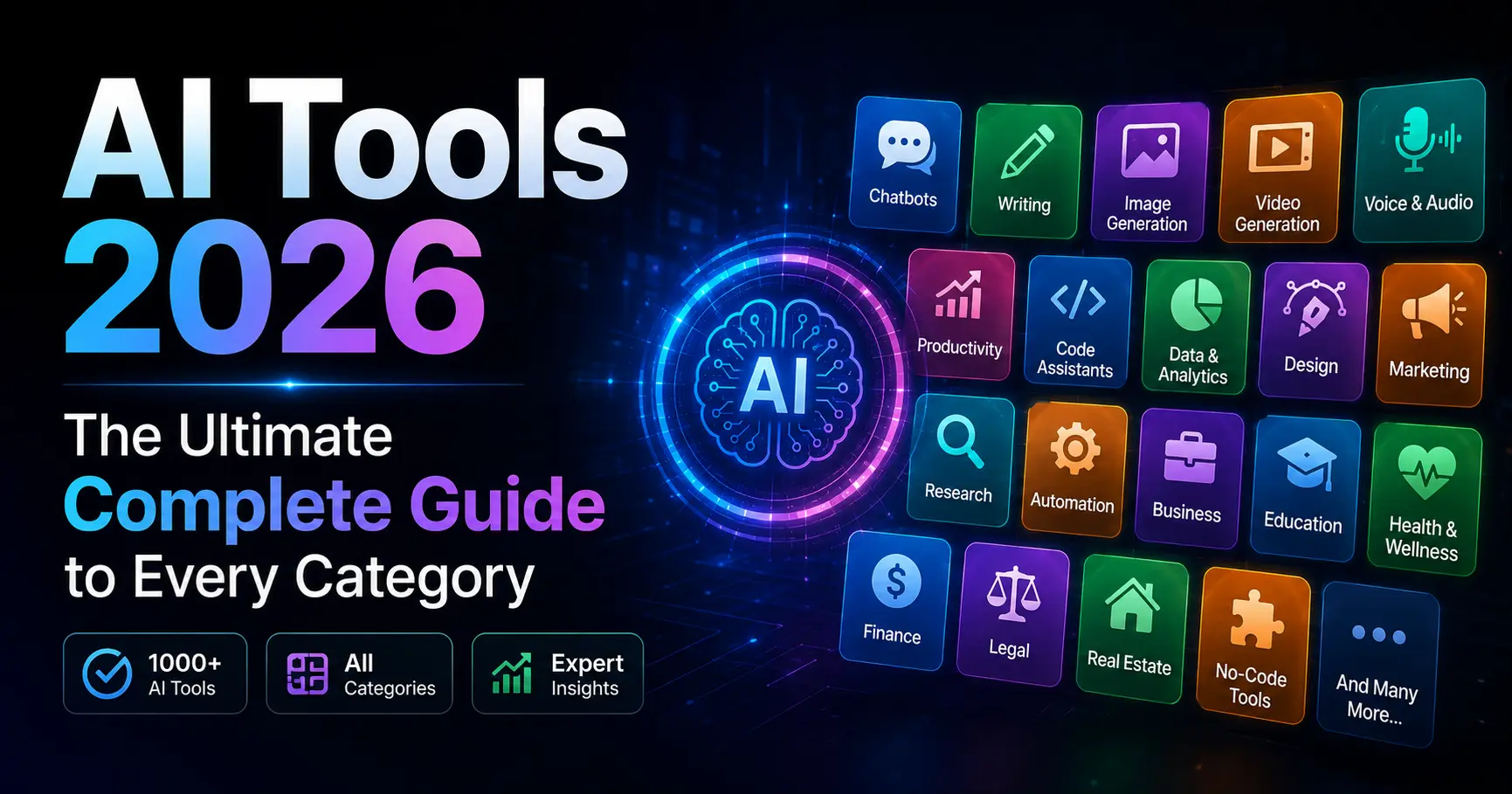
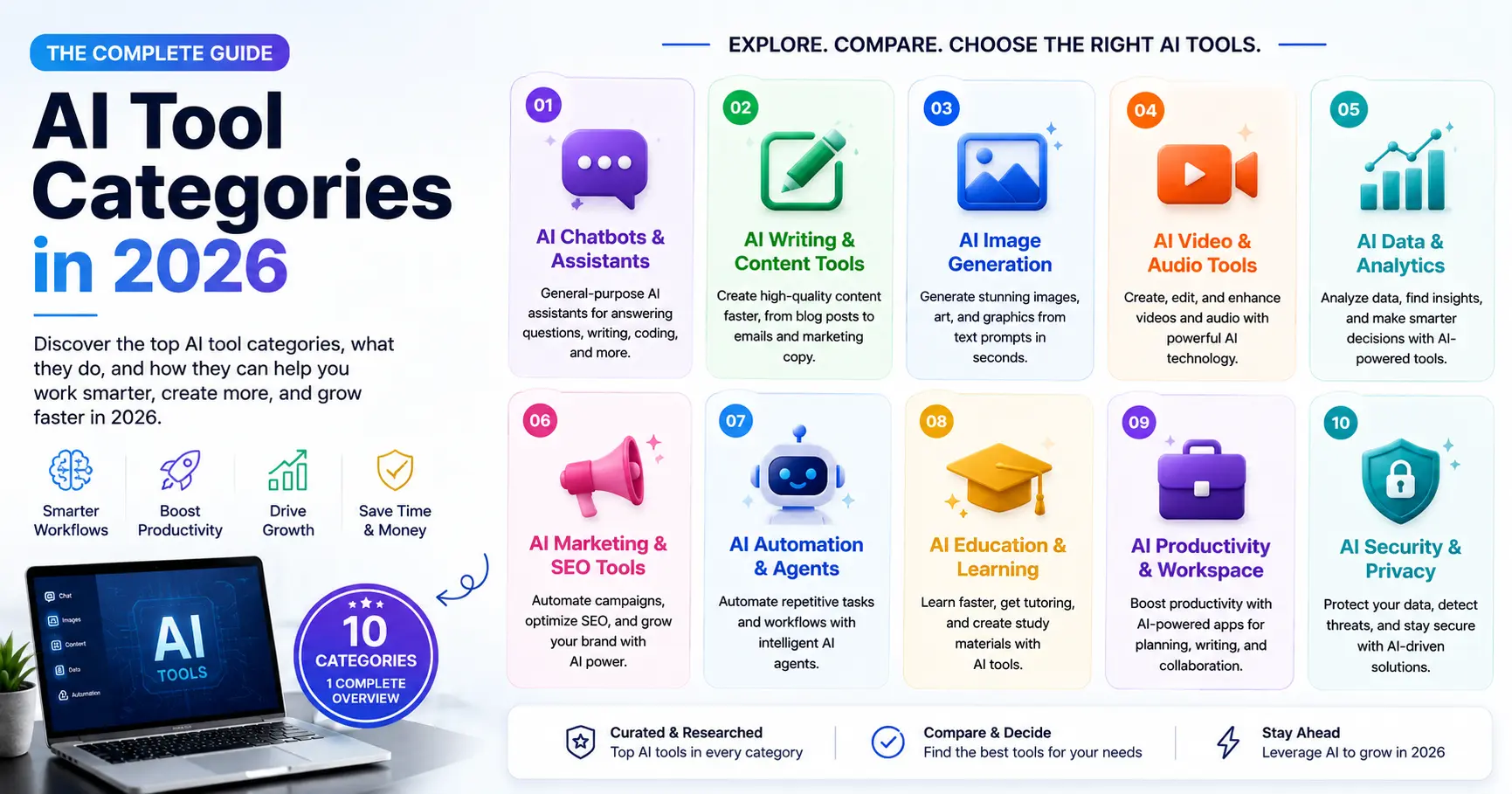
In 2026, AI tools fall into seven main categories: general-purpose AI assistants, coding tools, writing tools, research tools, image generators, video tools, and productivity tools. The category leaders are ChatGPT (all-round), Cursor (coding), Claude (writing and reasoning), Perplexity (research), and Midjourney (image quality). Which one you need depends entirely on your job, not on which tool is generating the most headlines.
Key takeaways
- 65% of US organizations now use generative AI in at least one business function, up from 33% in 2023 (McKinsey, Q1 2026).
- AI tools span seven distinct categories in 2026, each with its own leaders, pricing, and ideal user profiles.
- 90% of professional developers use at least one AI coding tool at work, and the average saves 3.6 hours per week.
- Midjourney (from $10 per month) leads AI image quality; Adobe Firefly is the only commercially safe option with licensed training data.
- Free tiers are genuinely useful in 2026: ChatGPT Free, Claude Free, GitHub Copilot Free, and Google NotebookLM all deliver real value without a credit card.
- The biggest mistake professionals make is choosing based on brand recognition rather than task fit.
65% of US organizations now use generative AI in at least one business function. That number was 33% just two years ago. The acceleration is not slowing down.
The global AI market hit $390.91 billion in 2026, according to GloriumTech research, and enterprise adoption jumped from 22% to 40% in a single year. Major technology companies collectively invest $650 billion annually in AI infrastructure, per BCC Research. This is not a trend anymore. It is the default operating environment.
The problem is not access. Most professionals can reach ChatGPT or Claude in under 30 seconds. The problem is knowing which tool belongs in which situation, and why paying $20 per month for one subscription might save you $200 per month in another tool. This guide maps every major category of AI tool in 2026, names the leaders in each, and tells you precisely who each tool is built for.
Why the AI tool landscape changed completely in 2026
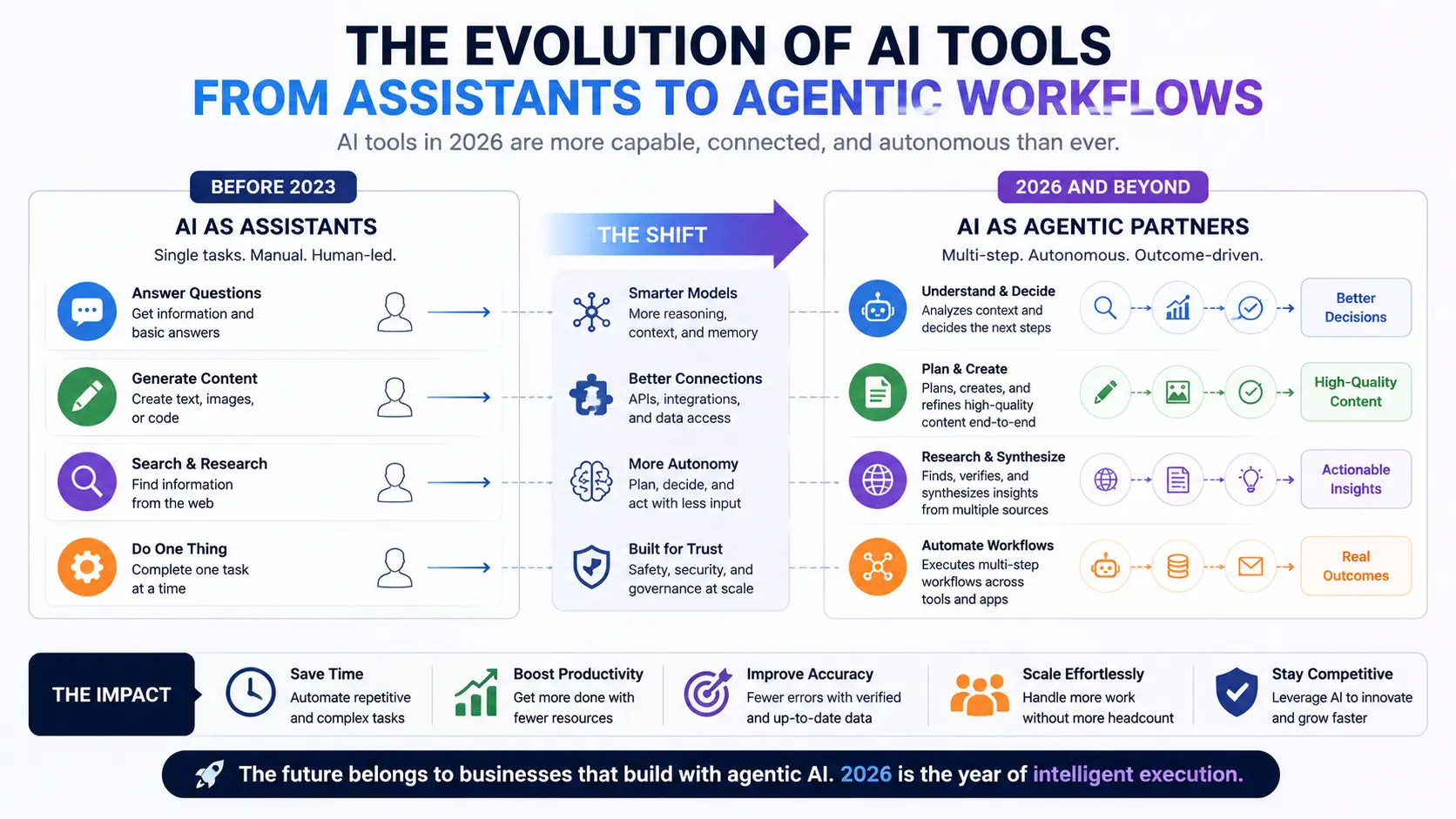
The shift that matters most in 2026 is not model quality. It is the move from tools to agents. Reasoning is now the default, not a premium feature you pay extra for. OpenAI merged its o-series reasoning models into GPT-5.4. Anthropic shipped Claude Opus 4.7 with adaptive thinking. Google’s Gemini 3.1 Pro blends reasoning into the base model. Every top-tier assistant now thinks before answering.
The second shift is that agents have moved from demos to production. Microsoft’s Copilot Wave 3 (March 2026) brought autonomous multi-step task execution into Microsoft 365. Cursor 3 rebuilt its IDE around an Agents Window that runs fleets of autonomous coding processes in parallel. Claude Cowork became generally available on macOS and Windows, letting the AI work directly on your files without copy-pasting into a chat window.
The practical result: in 2026, AI tools do not just assist. The best ones act. That changes how you evaluate them, and it changes the cost-benefit calculation significantly.
Category 1: General-purpose AI assistants
General-purpose AI assistants are the entry point for most people and the backbone of most professional AI stacks. They handle questions, writing, analysis, document review, brainstorming, and coding in a single interface. Four names dominate this category in 2026.
ChatGPT (OpenAI, San Francisco)
ChatGPT running GPT-5.4 is the most broadly capable AI assistant available. GPT-5.4 scored 83% on OpenAI’s GDPval knowledge work benchmark and topped the OSWorld-Verified leaderboard for computer use. The API version offers a 1 million token context window. Its native computer use means GPT-5.4 can operate desktop environments and complete long-horizon tasks that previously required custom agent frameworks. Free tier available. Plus at $20 per month. Pro at $200 per month for heavier Codex use.
Claude (Anthropic, San Francisco)
Claude Opus 4.7 (shipped April 2026) posted a 12-point gain on CursorBench over 4.6, supports high-resolution image input, and introduced task budgets so long-running agents cannot silently exhaust your quota. Claude is consistently rated best for long-form writing, nuanced reasoning, and codebase comprehension. Anthropic’s annualized revenue reached $30 billion in April 2026. 8 of the Fortune 10 are now Claude enterprise customers. Free tier available. Pro at $20 per month. Max at $100 per month.
Gemini 3.1 Pro (Google DeepMind, Mountain View)
Gemini is the natural choice for users already inside Google Workspace. Gemini for Docs, Sheets, and Gmail reduces friction for teams where switching out of Google products would cost more productivity than any model quality difference saves. Gemini also powers NotebookLM. Free with Google account. Advanced at $19.99 per month.
Grok (xAI)
Grok 3 is built for real-time thinking and X platform integration. Its deep reasoning and live web search make it a strong choice for developers and analysts who need current data baked into every answer. Strong for fact-checking and breaking topics. Available via X Premium Plus.
Category 2: AI coding tools
AI coding tools are the highest-penetration category in 2026. 90% of professional developers use at least one AI coding tool at work, and daily use is common at 51%, according to research from DX and JetBrains. The average developer saves 3.6 hours per week. GitHub Copilot has 20 million users, adopted across 90% of Fortune 100 companies. For a full head-to-head, see our guide to best AI tools for coding in 2026: Claude Code vs Copilot vs Cursor.
Cursor
Cursor is the dominant AI-native IDE in 2026. It grew from $0 to $1 billion in annual recurring revenue in roughly three years, with a December 2025 Series D valuing the company at $29.3 billion. Its Supermaven-powered autocomplete is the fastest in the category. Cursor 3’s Agents Window runs fleets of autonomous coding agents in parallel. Multi-file editing, codebase context, and seamless model switching between Claude, GPT, and Gemini make it the most complete coding environment available. Free tier available. Pro at $20 per month. Business at $40 per month.
GitHub Copilot (Microsoft)
Copilot is the best bang for the buck in AI coding at $10 per month for Pro. It generates 46% of code written by active users, nearly double the 27% rate at launch in 2022. The free tier provides 2,000 completions and 50 chat messages per month. Copilot Wave 3 (March 2026) brought Claude technology directly into Microsoft 365 for non-developer workflows. Free, Pro at $10 per month, Business at $19 per month, Enterprise at $39 per month.
Claude Code (Anthropic)
Claude Code reached 18% developer adoption in January 2026, a 6x increase from its April 2025 launch, per JetBrains data. It excels at understanding complex codebases, refactoring functions, and explaining logic step by step. Where Cursor is fast, Claude Code is thorough. The best developer setups in 2026 use both. Included with Claude Pro and Max.
Windsurf (formerly Codeium)
Windsurf is the safe enterprise choice. FedRAMP compliance, on-premise deployment support, and 40+ IDE plugins make it the go-to for government contractors and regulated industries. Its Cascade feature guides beginners with step-by-step explanations. Free tier available. Pro at $15 per month.
Category 3: AI writing tools
The AI writing category split into two distinct segments in 2026: general-purpose LLMs that write extremely well (ChatGPT, Claude), and specialized writing platforms with built-in brand management, SEO, and workflow automation (Jasper, Copy.ai, Writesonic). Which segment you need depends on whether you want a capable writer or a content production pipeline. For detailed rankings and test results, see our guide to best AI writing tools in 2026: tested and ranked.
Claude (best for long-form and quality)
Multiple independent tests rate Claude as the best AI writer for long-form accuracy, structure, and natural prose. Its 200K token context window means you can paste entire documents and revise them without losing context. Pro at $20 per month.
ChatGPT (best all-round writer)
ChatGPT remains the most versatile writing AI. It handles blog posts, emails, product descriptions, tone shifts, and translations in a single conversation. The free tier with GPT-4o mini covers shorter tasks. Plus at $20 per month unlocks the full model for longer content.
Jasper (best for enterprise marketing teams)
Jasper is purpose-built for marketing teams that need consistent, on-brand content at volume. Its Brand Voice feature learns your company’s tone, style, and terminology. Content Pipelines automate the workflow from brief to final draft. Pro starts at $69 per month per seat. Not a fit for solo users or budget-conscious teams.
Copy.ai (best for sales and GTM workflows)
Copy.ai has evolved beyond an AI writer into a full Go-To-Market AI platform. Prospecting Cockpit, lead scoring, and outbound workflow automation make it the right choice for sales and revenue operations teams. Starter at $49 per month, Advanced at $249 per month for teams.
Writesonic (best for SEO content at volume)
Writesonic bundles AI content generation with built-in SEO tools, Ahrefs integration, and GEO tracking so you can monitor how your brand appears in AI search results. It is the strongest choice for content teams whose primary KPI is organic traffic. Lite plan at $49 per month. Free trial at 10,000 words.
Grammarly (best editing layer)
Grammarly is not a content generator, it is the essential final editing layer. Its 2026 version includes a generative AI tier that can rewrite paragraphs and adjust tone. Works across every app via browser extension. Indispensable for business communication regardless of what you used to draft. Free plan covers most editing needs. Pro at $12 per month billed annually.
Category 4: AI research tools
Research tools are the most underrated category for business professionals. They go beyond chat by grounding answers in real sources, which reduces hallucination risk significantly. For a full breakdown of the category leader, see our Perplexity AI review 2026.
Perplexity AI
Perplexity dropped ads in February 2026 and moved to a subscription-first model. Its Pro tier unlocks Perplexity Computer, a multi-agent system with 20+ models, hundreds of connectors, and a dedicated Codex coding subagent. Samsung’s Galaxy S26 integrates Perplexity APIs at the platform level. The core value proposition: ask a question, get a synthesized answer with inline citations you can verify. Best for market research, competitor analysis, and research-to-deliverable pipelines. Free plan available. Pro at $20 per month.
Google NotebookLM
NotebookLM is completely free and genuinely powerful. Upload your own sources, including PDFs, audio files, and web links, and NotebookLM creates a grounded AI expert on only that material. It will not hallucinate facts from the internet because it only works with what you give it. The Audio Overview feature converts your sources into a podcast-style discussion between two AI hosts. Essential for analysts, consultants, and anyone synthesizing large document sets. Free users can create up to 100 notebooks with 50 sources each.
Category 5: AI image generators
Over 15 million AI-generated images are created daily in 2026. The image generator market has four tools that genuinely do different things. Choosing the wrong one for your workflow wastes money or creates legal exposure. For a full comparison with test outputs, see our guide to best AI image generators in 2026: Midjourney, DALL-E, Firefly compared.
Midjourney V7 (best artistic quality)
Midjourney is the benchmark for artistic and photorealistic quality. Its Omni Reference feature allows character consistency across images, which made it essential for concept artists and creative teams in 2025. Midjourney V8 Alpha was previewed in March 2026. No free plan: Basic at $10 per month (around 200 images in Fast mode), Standard at $30 per month with unlimited Relax mode generation. Best for: creatives, marketers, and designers where visual quality is the priority.
GPT Image 1.5 via ChatGPT (best for prompt accuracy and text in images)
OpenAI retired DALL-E 3 and built GPT Image 1.5 natively into the ChatGPT interface. Text rendering accuracy sits around 95%, the highest in the category. If your image needs legible words, logos, or typography, this is the correct tool. Included with ChatGPT Plus at $20 per month.
Adobe Firefly (best for commercial use)
Adobe trained Firefly exclusively on licensed Adobe Stock imagery, openly licensed content, and public domain works. It is the only major AI image generator that provides commercial indemnification against copyright claims. Firefly’s Generative Fill inside Photoshop remains one of the most practically useful AI features in the creative industry. The legal protection alone justifies the cost for commercial teams. Included with Adobe Creative Cloud subscriptions starting at $55 per month.
FLUX 1.1 Pro (best for photorealism via API)
FLUX by Black Forest Labs dominates in photorealism with 4.5-second generation times. At $0.06 per image via API, it is the most cost-effective option for developers building image generation into applications. No subscription required. Best for: developers, technical users, and anyone generating fewer than 150 images per month where per-image pricing beats flat subscriptions.
Category 6: AI video tools
AI video is the fastest-evolving category in 2026 and also the one with the highest gap between hype and practical usefulness. For most business professionals, three tools deliver real value.
Synthesia (best for business video)
Synthesia turns scripts, documents, presentations, and webpages into polished videos with AI avatars. No filming, no editing, and non-technical teams can produce professional-looking content in minutes. The best use cases are employee training, onboarding, product explainers, and internal communications. Its AI Playground provides free access to Google’s Veo 3 and OpenAI’s Sora 2 for B-roll experimentation.
Sora 2 (OpenAI) via ChatGPT
Sora 2 is integrated directly into ChatGPT, which means ChatGPT Plus subscribers have access without a separate subscription. It excels at cinematic, story-driven clips and is one of the stronger narrative video creation platforms available. Best for: creatives and marketers who need high-quality short-form video without a separate subscription overhead.
Kling AI (best for photorealistic motion)
For realistic motion, Kling AI’s Kling 3.0 model currently leads the category. It maintains character identity, tone, and continuity across scenes better than any competitor. Best for: creators who need a person performing an action to look physically believable.
Category 7: AI productivity tools
Productivity tools are where AI adoption is highest in terms of daily minutes spent. 70% of employees use AI tools for at least 30 minutes daily, per Writer’s 2026 enterprise survey. The tools in this category reduce friction on existing workflows rather than creating new ones.
Microsoft Copilot Wave 3
Microsoft’s biggest Copilot update since launch brought autonomous multi-step task execution into Microsoft 365 in March 2026. Excel, Word, and PowerPoint Agents are now generally available. The E7 Frontier Suite bundles M365, Copilot, and Agent 365 at $99 per user per month. Best for: enterprise teams already standardized on Microsoft 365.
Notion AI
Notion AI is embedded directly inside Notion’s workspace. It summarizes meeting notes, rewrites pages, generates action items from docs, and answers questions about your Notion content. If your team already lives in Notion, the AI features add significant daily value without a new tool to learn. Add-on at $10 per member per month.
Gamma
Gamma turns notes, outlines, and documents into clean, styled presentations in minutes. For professionals who present regularly and do not want to spend time on slide design, it replaces a substantial part of the PowerPoint workflow. Free plan available. Plus at $8 per month. Pro at $15 per month.
Fathom
Fathom joins Zoom and Microsoft Teams meetings, transcribes the conversation, and produces structured summaries with action items. It is free for most individual use cases. For professionals with dense meeting schedules, it eliminates the need for manual notes and follow-up summaries. Free plan available. Paid plans from $15 per month with CRM sync.
The master comparison table: all categories at a glance
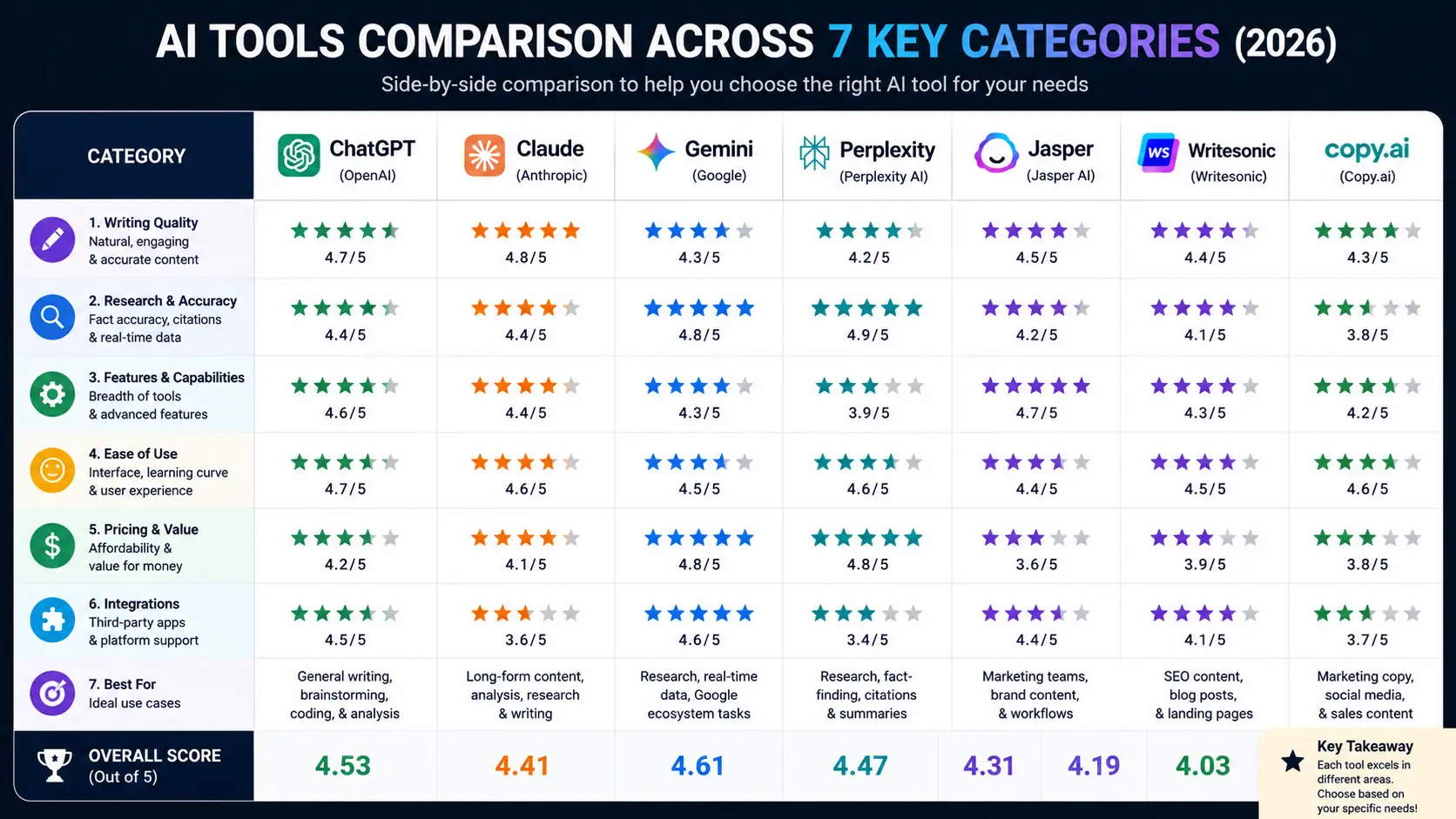
This table covers the top pick in each category, its primary strength, pricing, and whether a useful free tier exists.
| Category | Top pick | Primary strength | Paid plan starts at | Free tier |
|---|---|---|---|---|
| AI assistant (all-round) | ChatGPT (GPT-5.4) | Broadest capability, computer use, 1M context | $20/mo (Plus) | Yes |
| AI assistant (writing + reasoning) | Claude (Opus 4.7) | Best long-form writing and complex reasoning | $20/mo (Pro) | Yes |
| AI coding (full IDE) | Cursor | Fastest autocomplete, multi-file agents, $29.3B valuation | $20/mo (Pro) | Yes |
| AI coding (VS Code native) | GitHub Copilot | 20M+ users, Fortune 100 standard, $10/mo value | $10/mo (Pro) | Yes (2,000 completions/mo) |
| AI writing (enterprise) | Jasper | Brand voice, team workflows, content pipelines | $69/mo (Pro) | No (7-day trial) |
| AI writing (SEO + editing) | Grammarly + Writesonic | Grammarly for polish; Writesonic for SEO-focused drafts | $16/mo (Writesonic) | Yes (both) |
| AI research | Perplexity AI | Citations, real-time search, multi-agent Perplexity Computer | $20/mo (Pro) | Yes |
| AI research (document-based) | Google NotebookLM | Source-grounded answers, Audio Overview, fully free | Free | Yes (fully free) |
| AI image (artistic quality) | Midjourney V7 | Highest visual quality for creative work | $10/mo (Basic) | No |
| AI image (commercial safe) | Adobe Firefly | Fully licensed training data, commercial indemnification | Included with Creative Cloud ($55/mo) | Limited |
| AI video (business) | Synthesia | AI avatars, no filming required, team-ready | $29/mo (Starter) | Demo only |
| AI productivity (enterprise) | Microsoft Copilot Wave 3 | M365 integration, autonomous agents, Claude-powered | $30/mo (Copilot) or $99/mo (E7) | Limited |
Pricing as of May 2026. All figures in USD. Prices may vary by plan and billing cycle.
How to choose the right AI tool for your role
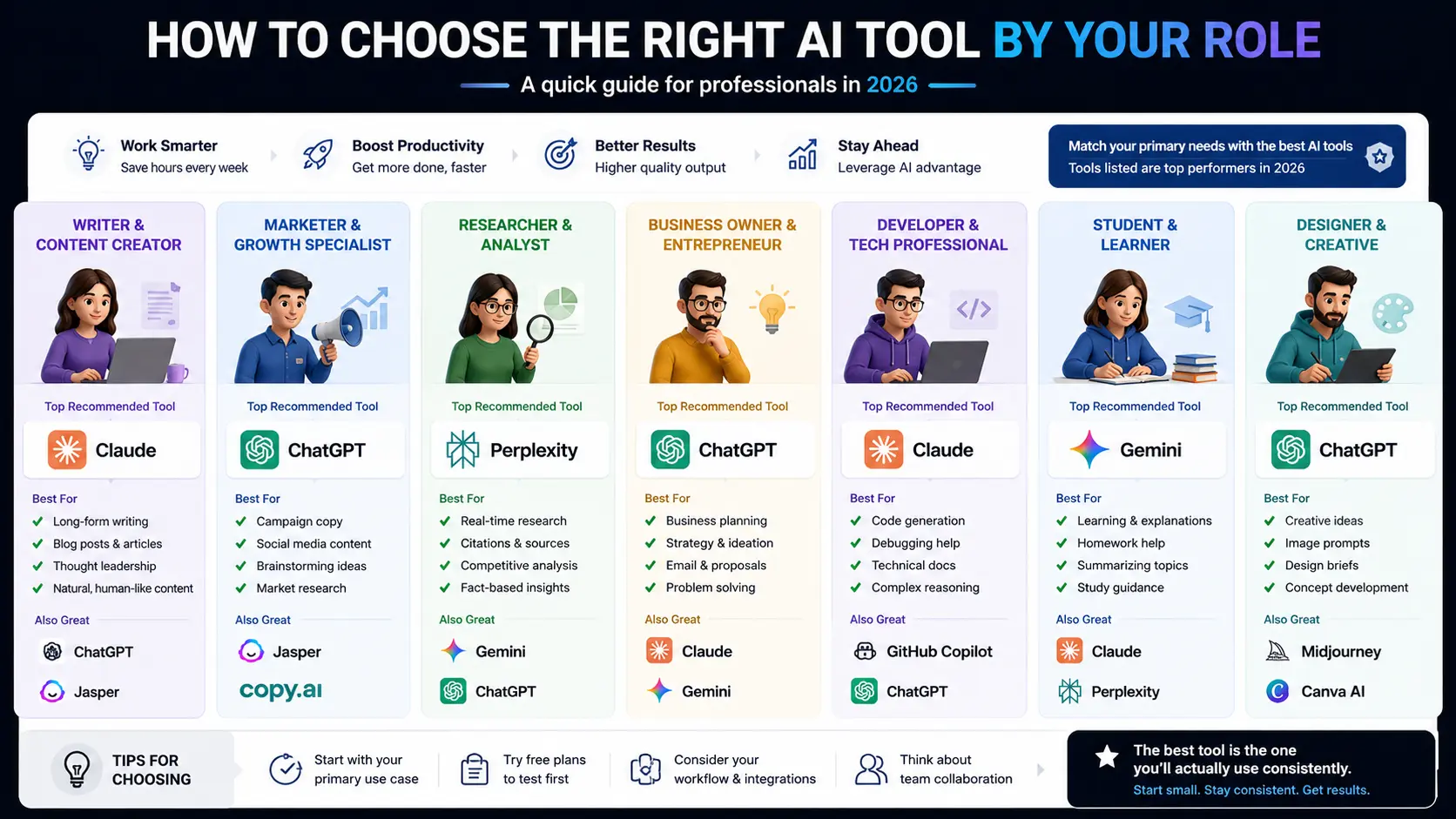
The most important thing to know before choosing an AI tool: category fit matters more than model benchmark scores. A developer using ChatGPT instead of Cursor is not wrong, but they are leaving most of the value on the table. Here is how to match tool to role.
For business leaders and executives
Start with ChatGPT Plus or Claude Pro for document analysis, meeting preparation, and strategic thinking. Add Microsoft Copilot if your team runs on M365. These three tools cover 90% of executive-level AI use cases without requiring technical setup. Total cost: $20 to $50 per month per person.
For developers and engineers
The baseline stack is Cursor (or GitHub Copilot inside VS Code) plus Claude Code for complex codebase work. If your organization requires FedRAMP compliance, Windsurf instead of Cursor. Add Perplexity for research-heavy technical queries. The full stack runs $30 to $40 per month and saves well over 3 hours per week.
For content writers and SEO teams
Claude or ChatGPT for drafting, Grammarly for editing, and Writesonic or Surfer SEO if organic search is a primary channel. For enterprise marketing teams with brand consistency requirements, Jasper is worth the premium. See our guide to best AI tools for marketing in 2026 for a full breakdown.
For designers and creative teams
Midjourney for highest artistic quality in campaign imagery. Adobe Firefly for anything requiring full commercial rights and integration with your existing Photoshop workflow. GPT Image 1.5 for images with text overlays. Canva’s Magic Studio for non-designers who need quick visuals.
For students and beginners
Start with ChatGPT Free for general tasks and Perplexity Free for research. Add Google NotebookLM for document-based studying. Claude Free is the best second tool for essay writing and structured reasoning. This three-tool free stack covers the majority of student needs. See our guide to best free AI tools in 2026 for more options with no credit card required.
Three costly mistakes to avoid when building your AI tool stack
79% of organizations face challenges adopting AI despite high investment, per Writer’s 2026 enterprise survey. The failure patterns are consistent. Here are the three that cost the most.
Choosing by brand recognition instead of task fit
ChatGPT is the most recognized AI tool in the world. That does not make it the best tool for every job. Teams paying for ChatGPT Plus when their primary use case is coding lose significant productivity compared to teams using Cursor. Teams paying for Midjourney when they need images with readable text get poor results compared to GPT Image 1.5. Map your actual tasks to the category leaders before subscribing.
Using shadow AI tools that IT cannot govern
67% of executives report their company has already suffered a data breach due to unapproved AI tools, according to Writer’s 2026 survey. Employees choosing their own tools outside of IT-approved stacks create serious security and compliance exposure. For enterprise deployments, Microsoft Copilot with Agent 365 governance, or Windsurf for developers, gives IT the control layer while maintaining productivity. Do not let tool sprawl run ahead of your security posture.
Treating AI outputs as finished work
AI coding tools increase issue rates by approximately 1.7x compared to human-only code when deployed without review gates, per independent code analysis from 2026. AI-generated content still requires human fact-checking, editing, and judgment. The organizations getting the highest AI ROI, reporting 3.4x blended returns per McKinsey, treat AI outputs as draft material that a human improves, not as finished deliverables. Build review into your workflow before you ship anything AI-generated.
Frequently asked questions
What is the best AI tool in 2026?
The best AI tool depends on your use case. ChatGPT with GPT-5.4 is the best all-rounder. Claude is best for long-form writing and complex coding tasks. Cursor is the dominant choice for professional software development. Midjourney leads for AI image quality. There is no single winner across all categories because each category has a different leader and a different pricing structure.
How many people are using AI tools in 2026?
According to McKinsey’s Q1 2026 survey, 65% of organizations now use generative AI in at least one business function. Among knowledge workers, 38% use generative AI tools daily, up from 11% in 2024. ChatGPT alone reached 400 million monthly active users in early 2025, and GitHub Copilot has over 20 million users adopted across 90% of Fortune 100 companies.
What are the main categories of AI tools in 2026?
The seven main categories of AI tools in 2026 are: general-purpose AI assistants (ChatGPT, Claude, Gemini, Grok), AI coding tools (Cursor, GitHub Copilot, Claude Code), AI writing tools (Jasper, Copy.ai, Writesonic, Grammarly), AI research tools (Perplexity, NotebookLM), AI image generators (Midjourney, Adobe Firefly, GPT Image 1.5), AI video tools (Synthesia, Sora 2, Kling AI), and AI productivity tools (Microsoft Copilot, Notion AI, Gamma, Fathom).
Are there free AI tools worth using in 2026?
Yes. Several free tiers are genuinely useful, not just limited demos. GitHub Copilot Free gives developers 2,000 code completions per month. ChatGPT Free and Claude Free provide capable general-purpose AI for most everyday tasks. Google NotebookLM is completely free. Gemini Free is strong for Google Workspace users. For a full breakdown of the best options, see our guide to best free AI tools in 2026.
Which AI tool is best for coding in 2026?
Cursor is the dominant AI coding tool in 2026, valued at $29.3 billion and used across most Fortune 100 companies. GitHub Copilot leads for VS Code integration and the best value at $10 per month. Claude Code is the strongest choice for understanding complex codebases and refactoring. The best professional setups often combine two tools: Cursor for active development and Claude Code for deep code review. Our full guide to best AI coding tools in 2026 covers all three in detail.
What AI tool should a beginner start with?
Beginners should start with ChatGPT for general tasks and Perplexity for research. Both have functional free tiers, clear interfaces, and immediate usefulness on day one. Claude is the best second tool for writing and longer documents. Starting with two or three tools focused on actual tasks beats trying to learn ten at once.
How much do enterprise AI tools cost in 2026?
Enterprise AI tool costs vary significantly by category. Individual subscriptions range from $10 to $20 per month for most consumer-grade tools. Enterprise plans start around $25 to $40 per user per month for most LLM platforms. Microsoft’s E7 Frontier Suite, which bundles Microsoft 365, Copilot, and Agent 365 governance, costs $99 per user per month. API access is priced separately and scales with usage volume.
Go deeper: the complete AI tools series
This article is the hub of BriefArticle’s AI tools content cluster. Each guide below covers one specific area in full detail:
- Best AI Writing Tools in 2026: Tested and Ranked: full comparison of ChatGPT, Claude, Jasper, Grammarly, Copy.ai, and Writesonic with test results and pricing.
- Best Free AI Tools in 2026: No Credit Card, No Catch: every genuinely useful free tier across all categories, verified in May 2026.
- Best AI Tools for Coding in 2026: Claude Code vs Copilot vs Cursor: head-to-head comparison for professional developers with benchmark data and pricing.
- Best AI Tools for Marketing in 2026: Ranked by Real Results: tools ranked by documented ROI, from content generation to campaign automation.
- Best AI Image Generators in 2026: Midjourney, DALL-E, Firefly Compared: complete breakdown with test images and commercial rights analysis.
- Perplexity AI Review 2026: Is It Really Better Than Google for Research: honest verdict on Perplexity’s Pro tier, Perplexity Computer, and whether the $20 per month is justified.
Bottom line
AI tools in 2026 are not optional infrastructure for competitive businesses, they are standard operating equipment. The AI market reached $390 billion globally, enterprise adoption doubled in a single year, and 90% of developers already use at least one AI coding tool. The question is no longer whether to use them but which combination fits your actual workflow.
The category that will matter most in the next 12 months is agentic AI: tools that do not wait for your prompt but execute multi-step tasks autonomously on your behalf. Cursor’s Agents Window, Microsoft Copilot Wave 3, and Claude Cowork are early versions of this model. Every category above will have an agentic layer by the end of 2026.
Start with the category that fits your day job, pick the leader in that category, and build from there. If you want to track new tools as they launch, subscribe to the BriefArticle daily brief delivered at 7:30 AM EST, Monday to Friday.
Get the daily AI brief
Delivered at 7:30 AM EST, Monday to Friday. The signal without the noise. Free. No fluff. Unsubscribe anytime.